Count words, characters, and text stats instantly
Whether you are writing an article, editing a product description, preparing a school assignment, drafting a blog post, or checking ad copy, text length matters.
This tool gives you a fast, live way to measure the most useful writing metrics in one place:
- Word count
- Character count
- Whitespace count
- Sentence count
- Paragraph count
- Estimated reading time
- Top word frequency
Just paste your text into the editor and the results update immediately.
No account, no uploads, no clutter.
What this Word Counter can do
Use it to:
- Count words for articles, essays, captions, emails, and reports
- Count characters for titles, metadata, social copy, and input limits
- Count characters without spaces for stricter text limits
- Measure whitespace to better understand formatting and density
- Estimate sentence count for structure and readability checks
- Count paragraphs for layout and document organization
- Calculate reading time for blog posts, pages, and announcements
- See the most repeated words to catch overuse and repetition
This makes it more than a simple word counter. It is also a lightweight text analysis tool for writers, students, marketers, editors, and content teams.
Workflow
1. Paste or type your text
Add any text into the editor:
- articles
- blog drafts
- landing page copy
- essays
- notes
- emails
- product descriptions
- social media captions
The analysis updates live as you type.
2. Review the live text stats
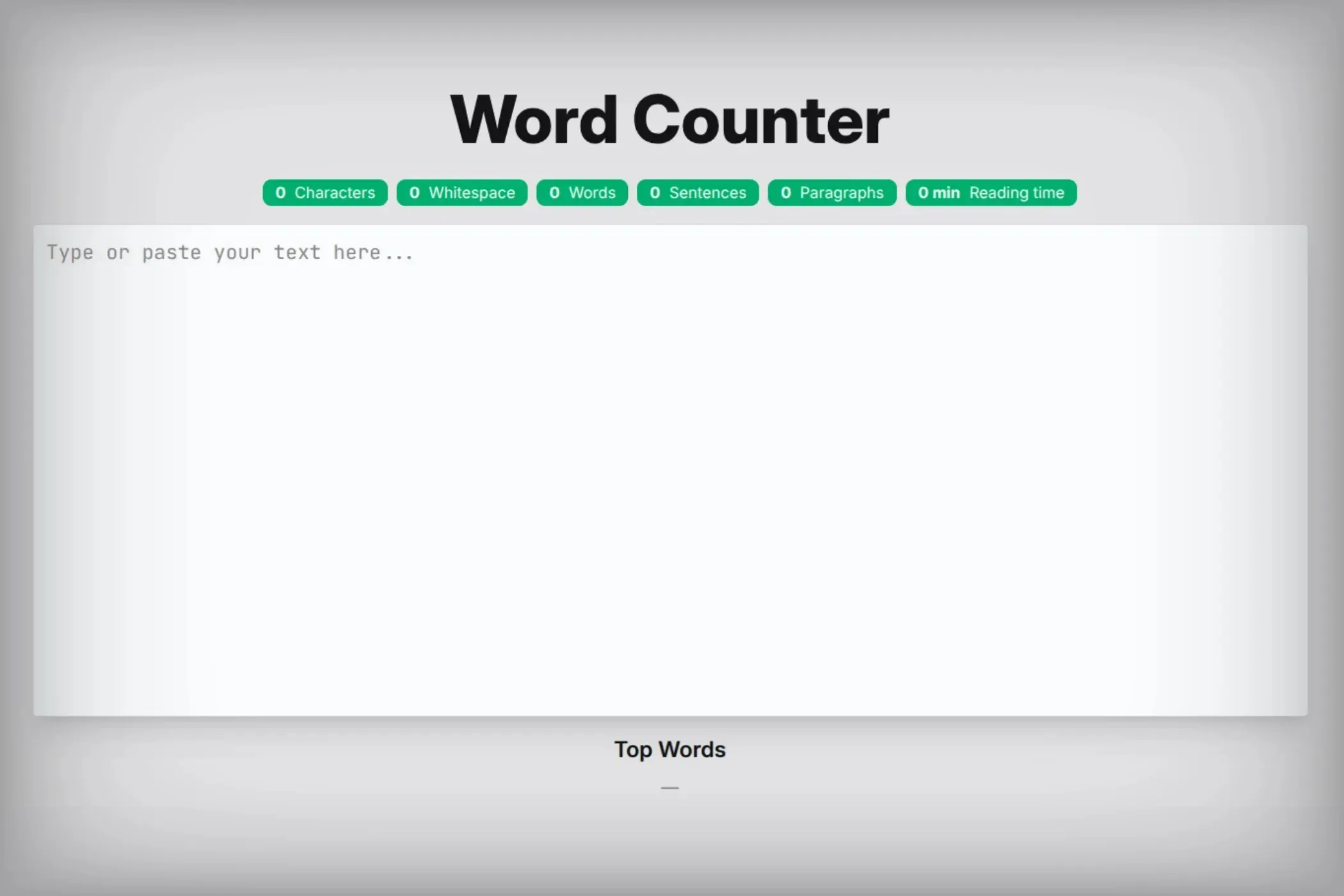
At the top of the tool, you instantly see:
- characters (without spaces)
- whitespace
- words
- sentences
- paragraphs
- reading time
This helps you understand both the size and structure of your text at a glance.
3. Check repeated words
Below the editor, the tool shows the top words found in your text.
This can help you:
- detect repetition
- spot keyword overuse
- identify filler words
- tighten weak drafts
- improve clarity and style
Metrics explained
Word count
Word count is the most common writing metric.
It helps when you need to:
- hit assignment requirements
- stay within article targets
- estimate reading depth
- control the size of product descriptions or page copy
- manage freelance or editorial deliverables
This tool uses a more practical matching approach than ultra-basic counters. It is designed to treat many real-world patterns—such as URLs, emails, number formats, and common abbreviations—more intelligently.
Character count
Character count is useful when space is limited.
It matters for:
- SEO titles and descriptions
- form limits
- social media post planning
- ad copy
- UI labels
- app and CMS field constraints
Characters without spaces
This count removes whitespace and gives you a stricter view of raw text length.
Useful for:
- systems with hard character caps
- technical input validation
- comparing actual content density
Whitespace count
Whitespace helps you understand how much of your text length comes from:
- spaces
- line breaks
- formatting gaps
This can be surprisingly useful when comparing short and long drafts, checking text density, or cleaning bloated formatting.
Sentence count
Sentence count helps you evaluate how your text is structured.
This is useful for:
- readability checks
- education and academic writing
- simplifying long paragraphs
- editing content for better flow
A sentence count can also help you estimate how dense or fragmented a piece of writing feels.
Paragraph count
Paragraphs matter for visual readability.
Online content becomes harder to scan when it is one giant block. Counting paragraphs can help you improve:
- page scannability
- article structure
- email readability
- formatting consistency
Reading time
Reading time is estimated from the word count using a practical average reading speed of about 200 words per minute.
This gives you a useful estimate for:
- blog posts
- announcements
- newsletters
- landing pages
- documentation
- essays and reports
It is an estimate, not a strict promise, but it is extremely useful for planning content length.
Top words
The top-words section shows which words appear most often in your text.
This helps you quickly spot:
- repeated phrases
- keyword stuffing
- weak word variety
- filler terms
- ideas that are over-emphasized
For editing, this is one of the easiest ways to improve clarity fast.
Why word count alone is not enough
Many basic word counters only show one number. That is useful—but not always enough.
Good writing decisions often require more context.
For example:
- A text can have a healthy word count but still be too dense.
- A short paragraph can still contain too many long sentences.
- A page can look clean visually while repeating the same word too often.
- A title can fit a word target but exceed a character limit.
That is why this tool combines word count, character count, sentence count, paragraph count, and reading time into one fast view.
It gives you a better understanding of the writing, not just a single number.
Smarter counting for real-world text
Not all text is clean, simple prose.
A useful word counter has to handle modern writing patterns like:
- emails such as
name@example.com - URLs like
https://example.com/page - initialisms such as
U.S.A.orE.U. - number sequences like
8:30,3.1415, or1,000.50 - apostrophes and hyphens inside words
- multilingual characters beyond basic ASCII
This matters because many simplistic counters can break these patterns apart incorrectly, inflating or reducing the real count.
This tool is built to handle those cases more gracefully, which makes it more useful for practical writing and modern web text.
Helpful use cases
Writers and bloggers
Use it to:
- hit article length targets
- estimate reading time for posts
- improve paragraph structure
- catch repeated words during editing
Students and academics
Use it to:
- stay within essay limits
- check paragraph count for structure
- review sentence density
- monitor overall draft size
SEO and content marketing
Use it to:
- check title and metadata lengths
- estimate page reading time
- balance article size across a content cluster
- reduce awkward keyword repetition
Copywriters and advertisers
Use it to:
- manage limited character spaces
- tighten headlines and CTAs
- compare alternative drafts quickly
Product and UX teams
Use it to:
- validate field limits
- keep labels concise
- measure message size in interfaces
- compare content variants
Anyone editing text quickly
Even if you just need a fast answer—“How many words is this?”—the live counter makes it instant.
Reading time: why it matters
Reading time is one of the most practical content signals for modern websites.
It helps you:
- set reader expectations
- compare content depth across pages
- decide whether a draft feels too long or too thin
- plan better article structure
For example:
- a short announcement might be under 1 minute
- a standard blog article may land around 3–7 minutes
- a long guide could be 10+ minutes
Even if it is approximate, it gives useful context for both writers and readers.
Using top word frequency to improve writing
The Top Words section is especially useful during editing.
If you notice the same word appears too often, you can:
- replace repeated terms with stronger alternatives
- remove filler words
- vary sentence construction
- improve tone and readability
- reduce accidental keyword stuffing
For SEO writing, this is helpful because it encourages more natural language rather than repetitive phrasing.
For general writing, it helps your draft feel sharper and more polished.
Tips for cleaner, more readable writing
- Break long blocks into shorter paragraphs.
- Watch for repeated words that weaken your message.
- Use sentence count as a signal, not a rule.
- Check character limits before publishing into forms or CMS fields.
- Use reading time to compare whether a piece is too thin or too long for its purpose.
- Edit with both clarity and constraints in mind.
A good text counter is not just for measuring length. It helps you make better editing decisions.
Troubleshooting
“Why does the word count differ from another tool?”
- Different tools use different token rules.
- Some split URLs, emails, abbreviations, or number formats differently.
- This tool aims for practical real-world counting, not the most simplistic possible split.
“Why is reading time only an estimate?”
- Reading speed varies by person, content type, and complexity.
- The tool uses a common average to give a useful approximation.
“Why are repeated words shown in lowercase?”
- Words are normalized for frequency analysis so the same word is grouped consistently regardless of capitalization.
“Does this work with multilingual text?”
- Yes. The counting logic is Unicode-aware, which helps it handle a wider range of languages and character sets more reliably than ASCII-only counters.
Perfect for
- Writers and bloggers
- Students and teachers
- Editors and proofreaders
- SEO teams and content marketers
- Copywriters and advertisers
- Developers checking input limits
- Anyone who needs fast text statistics
If you want a fast, private, and genuinely useful way to analyze text, this tool gives you more than a basic word total.
Count words, measure characters, estimate reading time, review structure, and improve your draft in one place.